7 Best AI Image Generators in 2026 for Different Creative Needs
AI image generators have moved beyond simply turning a few words into a picture. Today, these tools can create product concepts, marketing visuals, illustrations, social media content, website graphics, and much more.
Although many AI image generators work the same, their features, workflows, and results can vary significantly.
To see those differences firsthand, we tested seven AI image generators for different creative needs. All seven offer free access, so you can also try them before choosing a paid plan.
What Can You Use an AI Image Generator For?
AI image generators are useful when you need an original visual but don’t have the time, budget, or resources to create it from scratch. For example, you can use them to:
- Create marketing visuals: Generate custom imagery for advertisements, flyers, posters, email campaigns, and other promotional materials.
- Make social media content: Create images for Instagram, Facebook, LinkedIn, TikTok, YouTube, and other platforms.
- Visualize products and ideas: Turn an early concept into something you can actually see before investing time in a finished design.
- Create illustrations: Generate artwork, icons, backgrounds, and other design assets in different visual styles.
- Build website content: Produce hero images, blog graphics, backgrounds, and landing page visuals.
- Experiment with creative ideas: Quickly try different styles, compositions, settings, and concepts without creating each version manually.
- Edit existing images: Depending on the platform, AI can also replace objects, change backgrounds, expand images, or make other prompt-based edits.
The best platform depends not only on its features and capabilities, but also on your goals, including what you plan to create and what you want to do with the image afterward.
Best AI Image Generators at a Glance
Here’s a quick look at the seven AI image generators we tested and where each one stands out:
| AI image generator | Best for | Standout feature | Starting price | Free option |
| Design.com | All-around image creation | Connects AI images with 50+ design and AI tools | $3/month annually | Yes |
| Canva | Social media content | AI generation inside a template-based design platform | $15/month | Yes |
| Adobe Firefly | Generative editing | Extensive AI generation and editing tools | $9.99/month | Yes |
| Recraft | Illustrations and design assets | Image generation plus editable vector graphics | $25/month | Yes |
| Leonardo.Ai | Creative experimentation | Multiple models and generation controls | $12/month | Yes |
| Google Gemini | Conversational image creation | Generate and refine images through chat | $19.99/month | Yes |
| ChatGPT | Iterative image creation and editing | Conversational generation and follow-up editing | $20/month | Yes |
How We Tested the AI Image Generators
To compare the seven platforms fairly, we gave each AI image generator the same prompt and tested it using the free version wherever possible.
Our test prompt: Create a realistic product photo of a bright yellow coffee bag labeled “SUNRISE” on a wooden kitchen counter. Place a white ceramic coffee cup beside it, with a few scattered coffee beans. Use warm morning sunlight coming through a window, soft shadows, and a cozy modern kitchen in the background. Make the image look like a professional product photo with natural colors, clear details, and a vertical composition.
We evaluated how well each tool followed the prompt, the overall quality of the generated image, and how it handled details such as the subject, setting, colors, composition, and text. We also explored the editing and customization options available.
You’ll find the results from each platform alongside our observations below.
7 AI Image Generators Worth Trying in 2026
1. Design.com — Best All-Around AI Image Generator
Design.com’s AI image generator is one of the platform’s 50+ AI and design tools. It combines text-to-image generation with tools to refine images and create finished content.
The process is straightforward:
- Describe your image: Write what you want using everyday language, including the subject, setting, background, style, mood, lighting, colors, and composition.
- Generate your image: Design.com creates an image within seconds based on your prompt.
- Refine the result: Revise your prompt or add more details to explore different creative directions.
- Edit your image: Once you find a result you like, customize it further using manual and AI-powered editing tools.
You can generate a variety of visuals, including realistic scenes, product concepts, illustrations, abstract imagery, backgrounds, and custom graphics for websites, presentations, social media, and marketing materials.
What makes Design.com’s AI image generator stand out is what you can do with the image afterward. You can combine it with your logo, brand colors, fonts, and other brand elements, then use it across social media content, marketing materials, websites, presentations, and other projects.
What happened in our test:
Design.com followed nearly all the details in our prompt. It created a bright yellow coffee bag with the “SUNRISE” label spelled correctly, along with a white ceramic coffee cup and scattered coffee beans on a wooden counter. The warm sunlight, soft shadows, and modern kitchen background also matched the requested setting.
The final image looked realistic and polished, with clear product details and a composition that kept the coffee bag as the main focus.
Useful for:
Marketing visuals, social media content, website graphics, presentations, product concepts, and branded content.
Free access:
You can generate images without creating an account. A limited number of AI edits are also available for free.
Pricing:
The AI Design Plan starts at $3/month when billed annually. It includes:
- 50 AI-generated images per month
- AI image editing
- 50+ design and AI tools
- 651,000+ templates
The AI Design Plan + Website costs $5/month.
Good to know:
Design.com is also known for its logo maker, which offers 500,000+ professionally designed logo templates. Beyond logos and AI image generation, the platform includes tools for creating websites, business cards, social media content, presentations, posters, and other branded materials.
2. Canva — Best for Social Media Content
Canva AI’s Text to Image lets you generate images from a written prompt or reference photo. You can customize the output by choosing:
- 10+ preset styles, including Photo, Cinematic, Pop Art, Sketch, Vector, and Minimalist
- Different aspect ratios depending on your project
- A reference image to help guide the result
If you’re not satisfied with the results, adjust your prompt and generate another set to explore different creative directions.
Once you’ve chosen an image, you can download it or continue working in Canva’s editor. There, you can add text and other design elements, apply effects and filters, or incorporate the image into social media posts, presentations, posters, and other designs.
What happened in our test:
Canva followed the prompt well. It generated an image with a bright yellow coffee bag, white ceramic cup, and scattered coffee beans on a wooden counter. The warm sunlight, soft shadows, and blurred kitchen background also matched the requested setting.
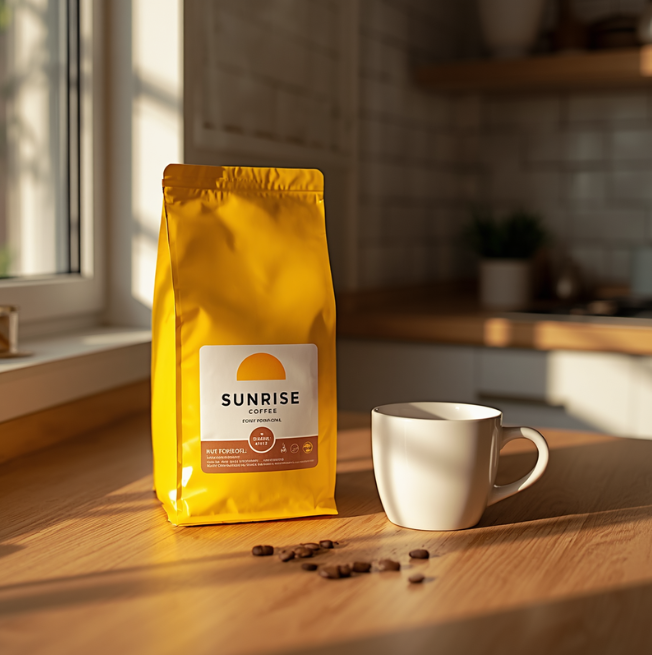
The “SUNRISE” label was spelled correctly and easy to read, while the overall image looked realistic and polished. Canva produced one of the stronger results in our test. However, Design.com had the edge in our comparison for its broader workflow for turning generated images into branded content.
Useful for:
Social media posts, presentations, simple marketing graphics, and everyday visual content.
Free access:
Canva Free includes up to 20 uses of Standard or Premium AI tools per month, including AI image generation. The allowance is shared across eligible AI tools and resets monthly.
Pricing:
Canva Pro costs $180/year and provides up to 200 Premium AI uses per month, along with additional premium design and editing features.
Good to know:
Several more advanced editing features are reserved for paid plans, so the free experience does not include everything available in Canva’s broader design suite.
3. Adobe Firefly — Best for Generative Editing
Adobe Firefly combines AI image generation with a strong collection of generative editing tools. You can create an image from a text prompt, then continue refining it using tools that let you:
- Add or remove objects
- Generate or replace backgrounds
- Expand images beyond their original borders
- Upscale images
- Make other changes using AI prompts
Firefly also gives you access to multiple AI models in one place. Alongside Adobe’s own Firefly models, you can generate images with partner models from companies such as Google and OpenAI. The platform also connects with Adobe’s wider creative ecosystem, allowing you to continue working on your images in tools such as Photoshop and Adobe Express.
What happened in our test:
Adobe Firefly generated the requested yellow coffee bag, white ceramic cup, scattered coffee beans, and wooden counter. It also captured the warm sunlight and kitchen background from the prompt.
The “SUNRISE” label was spelled correctly and stood out clearly on the packaging. The image had strong product detail and realistic lighting. However, the composition felt more like a straightforward product shot compared with the more polished result from Design.com.
Useful for:
Generative editing, creative experimentation, marketing visuals, and Adobe-based workflows.
Free access:
Adobe Firefly offers limited free daily generations across image and other generative features, with limits refreshing daily.
Pricing:
Firefly Standard currently starts at $9.99 per month and includes 2,000 monthly generative credits plus unlimited access to standard image features.
Good to know:
Firefly’s growing collection of models and options can be useful for experimentation, but beginners may need some time to understand the different controls and generation choices.
4. Recraft — Best for Illustrations and Design Assets
Recraft generates everything from photorealistic images to illustrations, logos, icons, and vector graphics. Its support for editable vectors also makes it useful for creating flexible design assets. It can help you create:
- Photorealistic images
- Illustrations and artwork
- Logos and icons
- Editable vector graphics
- Product visuals and mockups
The platform also gives you plenty of ways to refine your results. Its editing tools can remove backgrounds, erase or retouch elements, upscale images, convert images into vectors, and make changes using text prompts.
Another useful feature is its range of AI models. Recraft Studio includes its own Recraft models alongside options such as GPT Image, Ideogram, Imagen, and others, giving you different ways to approach the same creative project.
What happened in our test:
Recraft went for a more natural, almost lifestyle-photography look. The coffee bag had realistic wrinkles and reflections, while the sunlight created convincing shadows across the counter. It also rendered “SUNRISE” correctly.
Compared with our earlier results, though, the scene was noticeably moodier. Its darker kitchen and stronger shadows moved it away from the warm, bright commercial look we asked for.
Useful for:
Illustrations, vector graphics, icons, design assets, and visual concepts.
Free access:
Recraft offers up to 30 free image generations per day with no credit card required. Free creations are public and may appear in the Recraft community gallery.
Pricing:
Paid plans start at $25/month and include additional credits, private image generation, and other premium features.
Good to know:
Images created on a paid Recraft plan come with full ownership and commercial rights. If you’re using the free plan for business projects, check the usage terms before publishing your images commercially.
5. Leonardo.Ai — Best for Creative Experimentation
Leonardo.Ai gives you plenty of room to experiment with different styles and creative directions. You can generate images from text prompts or custom models, with options ranging from photorealistic product shots to illustrations, concept art, and stylized visuals.
It gives you access to different AI models, including its own Lucid models alongside options such as GPT Image, Nano Banana Pro, Seedream, Ideogram, and FLUX.
In addition, the platform lets you:
- Edit and refine existing images using AI
- Preserve elements such as characters, composition, and style while making changes
- Upscale images for greater resolution and detail
- Turn static images into AI-generated video
What happened in our test:
Leonardo.Ai delivered one of the more polished product shots in our test. The yellow packaging looked convincing, and the “SUNRISE” label was clear and correctly spelled. The warm lighting and softly blurred kitchen also gave the image the commercial feel we requested.
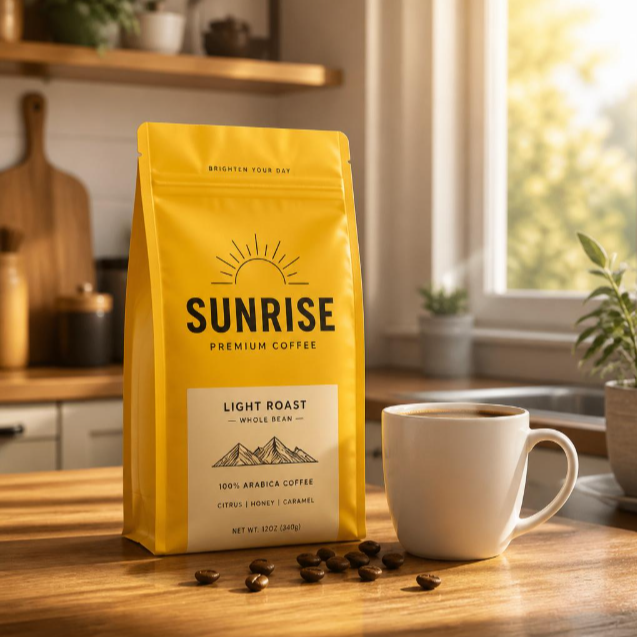
The warm morning light, soft shadows, and kitchen setting matched the prompt well. Overall, the image had a clean commercial look with a strong focus on the product. However, Design.com created a more natural and realistic scene.
Useful for:
Creative experimentation, concept art, stylized images, and users who want additional generation controls.
Free access:
Leonardo offers a free tier with 150 Fast Tokens per day.
Pricing:
Leonardo.ai’s Essential Plan starts at $12/month, or $10/month when billed annually, and includes 8,500 Fast Tokens per month, private generations, enhanced quality settings, and up to 10 personal AI models.
Good to know:
The number of models, settings, and controls may feel less straightforward for someone who simply wants to enter a prompt and get an image quickly.
6. Google Gemini — Best for Conversational Image Creation
Google Gemini approaches AI image creation as part of a conversation. You can describe the visual you want using natural language to generate an image.
If you’re not satisfied with the results, you can refine them with follow-up prompts. For example, you can ask the platform to change a specific part of the image, add or remove an element, adjust the setting, or upload reference images to guide the result.
What happened in our test:
Gemini created a warm, inviting scene that leaned more toward lifestyle photography than a traditional product shot. The sunlight, wooden counter, and softly blurred kitchen gave a natural morning atmosphere, while the yellow coffee bag remained the clear focal point.
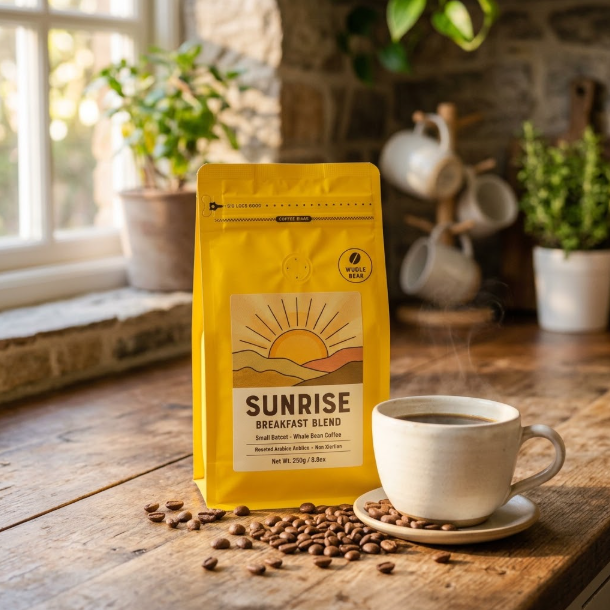
It also rendered “SUNRISE” correctly and produced convincing details and textures. However, the overall setting felt more rustic than the modern kitchen requested in our prompt.
Useful for:
Quick image generation, conversational refinement, brainstorming, and users who prefer natural-language instructions.
Free access:
Gemini offers free image generation with Nano Banana 2. Usage limits apply and may change based on availability and demand.
Pricing:
Google AI Pro costs $19.99/month and provides higher usage limits for Gemini, including expanded access to its image generation features.
Good to know:
Gemini is a general-purpose AI assistant rather than a dedicated design platform, so its image generation tools are part of a broader conversational AI experience rather than a traditional design workflow.
7. ChatGPT — Best for Iterative Image Creation and Editing
ChatGPT also takes a conversational approach to image generation like Google Gemini. You can describe the image you want, generate it, and then continue asking for changes. You can also upload an existing image and describe what you want to edit, including a specific area of the image.
ChatGPT Images can handle instructions such as adding or removing elements, changing details, inserting text, adjusting the composition, and creating transparent backgrounds. It can also use uploaded images as references when generating or editing visuals.
What happened in our test:
ChatGPT produced a clean, realistic image that followed the main elements of our prompt, including the yellow “SUNRISE” coffee bag, white cup, wooden counter, and warm kitchen setting.
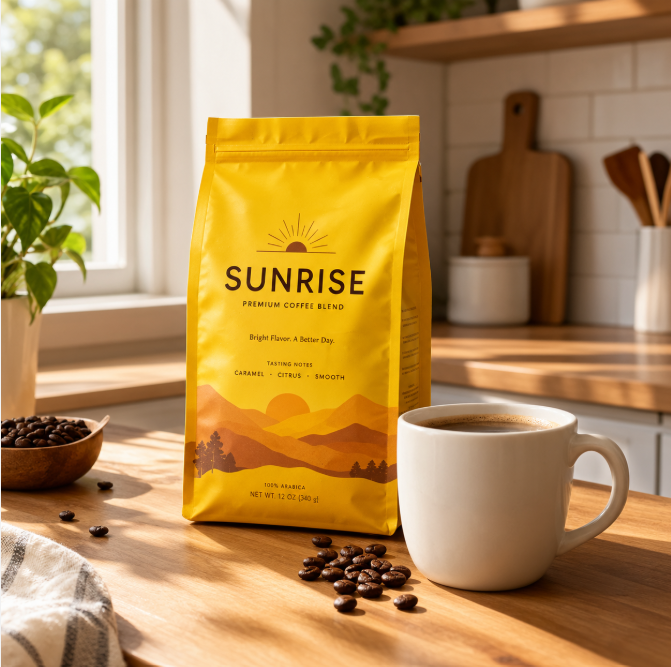
Compared with the other results, the image had a more staged and polished advertising look. The lighting was brighter and more pronounced, while the overall scene felt less natural than the softer, more photographic results from some of the higher-ranked platforms.
Useful for:
Iterative image generation, prompt-based editing, concept development, and conversational creative workflows.
Free access:
ChatGPT Free includes image generation, although usage limits are lower than on paid plans.
Pricing:
ChatGPT Plus costs $20/month and includes higher usage limits for image generation along with expanded access to other ChatGPT features.
Good to know:
ChatGPT is primarily an AI assistant rather than a full graphic design platform, so users creating finished marketing materials may still need additional design tools.
What to Look for in an AI Image Generator
AI image generators can differ significantly in the results they produce and what you can do with those images afterward. Before choosing one, consider:
- Prompt accuracy: Look for a generator that can follow details about the subject, setting, colors, lighting, composition, and other instructions.
- Image quality: Check whether the platform can produce the level of realism, detail, or visual style your projects require.
- Creative control: Some tools keep things simple, while others offer different models, styles, reference images, and generation settings.
- Editing tools: Consider whether you can refine the result, replace objects, change backgrounds, expand images, or make other AI-powered edits.
- Text rendering: If your images need signs, labels, packaging, or other visible text, check how reliably the generator handles words.
- Design workflow: Built-in tools for adding branding, creating layouts, or turning images into finished content can reduce the need to switch platforms.
- Usage rights: Check the platform’s terms if you plan to use generated images commercially or for client work.
- Pricing and limits: Compare free allowances, monthly credits, generation limits, and paid plans based on how often you expect to create images.
Final Thoughts
The best AI image generator depends on what you want to create and what you need to do with the image afterward. Some platforms offer more creative controls, while others focus on editing, design assets, or conversational workflows.
Among the seven platforms we tested, Design.com stands out as the best all-around option. It produced a polished, realistic result in our test while also providing tools to refine the image and turn it into finished creative content.
Its wider set of 50+ design and AI tools also makes it easier to take a generated image further. You can combine it with your logo, brand colors, fonts, and other elements to create social media content, marketing materials, presentations, websites, and more.
For businesses, marketers, and content creators who need more than a standalone AI-generated image, that connected workflow is what gives Design.com the edge in this comparison.