How to Practice Golf at Home Without Going to the Driving Range
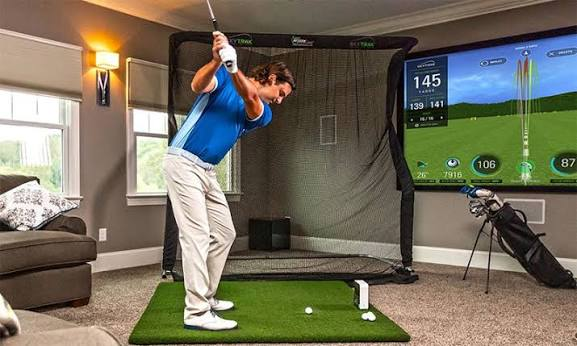
Driving ranges are fine. Nobody’s saying they’re not. But packing up the car, driving twenty minutes, queuing for a bay, and hitting a bucket of balls that don’t tell you anything beyond “that one went left,” it adds up. For a lot of golfers, that friction is the real reason consistent practice doesn’t happen. A golf simulator changes the equation. You hit from home, you get real shot data on every swing, and you can set up a focused drill in two minutes rather than thirty. This guide covers exactly how to make that work, from what you can practice, to which drills actually produce results, to what to do with all the data a modern simulator gives you.
Golf Simulator vs Driving Range for Practice
Before going further, it’s worth being honest about what each option actually offers. A home golf simulator and a driving range solve different parts of the practice problem, and understanding that gap makes both more useful.
| Factors | Golf Simulator | Driving Range |
| Location | Practice at home | Requires travel |
| Data | Detailed shot data on every swing | Usually no data |
| Environment | Controlled, consistent conditions | Outdoor variables |
| Courses | Virtual course play available | Real outdoor ball flight |
| Distance work | Easy to practice specific distances | Harder to measure accurately |
| Availability | Year-round, any time of day | Weather dependent |
A simulator doesn’t have to replace the driving range. The more useful frame is this: a golf simulator makes structured, data-driven practice more frequent and more convenient, while outdoor practice remains valuable for experiencing real conditions: wind, natural lie, the feel of hitting off actual turf. Use both where you can. When you can’t, the simulator is a genuinely complete substitute for most swing work.
What You Can Practice on a Golf Simulator
One assumption worth correcting early: simulators aren’t just for hitting drivers at virtual Pebble Beach. A well-configured setup handles most of what you’d work on at a practice facility.
- Full-swing mechanics: Every metric from club path to face angle is captured on full swings with every club. You can also refine golf grip techniques, setup, alignment, and swing positions.
- Club and ball contact: Smash factor and strike location data show exactly where the ball is making contact with the face.
- Distance control: Tracks carry distance per club and tightens your gapping across the bag.
- Shot direction: Start line and shot shape data identify the specific cause of directional errors.
- Putting: Many simulators include putting simulation with realistic green speed and break.
- Chipping and pitching: Short game practice with spin rate and carry data for wedge work.
- Bunker and recovery practice: Available on most simulator platforms, useful for developing feel on shots you rarely practice otherwise.
- Course management: Playing virtual rounds on real course layouts teaches decision-making that pure range practice doesn’t.
Best Golf Simulator Drills for Practising at Home
This is where the real value lives. A golf simulator produces data after every shot, which means drills that would be difficult to measure on a range become completely trackable at home. Each drill below follows the same format to make implementation straightforward.
Driver Accuracy Drill
Goal: Improve fairway-finding percentage with the driver.
Setup: Select a driving range target or fairway on a virtual course layout.
How to practice: Hit 20 drives aiming at a specific target. Count how many land within a defined zone.
What to track: Shot shape, start line, and dispersion pattern across the session.
How to improve: Identify whether misses share a common direction; consistent left misses suggest a closed face; consistent right misses usually indicate an out-to-in path.
Wedge Distance Ladder
Goal: Develop precise yardage control between 50 and 120 yards.
Setup: Choose four target distances within your wedge range: say, 60, 80, 100, and 120 yards.
How to practice: Work through all four targets in sequence, five shots each.
What to track: How close each carry lands to the intended yardage.
How to improve: If one yardage is consistently short or long, identify whether spin rate or club speed is causing the gap.
Club Gapping Drill
Goal: Know your actual carry distances for every club.
Setup: Open a driving range mode. Work through the bag from wedge to driver.
How to practice: Hit five shots per club, record the average carry.
What to track: The gap in carry distance between consecutive clubs.
How to improve: Identify where gaps are too large, common between long irons and fairway woods, and decide whether to add a club or adjust how you play those distances.
Random Practice Drill
Goal: Simulate the unpredictability of a real round.
Setup: Change club and target after every shot rather than hitting the same club repeatedly.
How to practice: Pick any club, any target, one shot. Then change both.
What to track: How quickly your performance returns to your average after switching clubs.
How to improve: If consistency drops sharply when clubs change, you’re relying on feel built up across a block of identical shots, not a durable skill.
Virtual Course Practice
Goal: Apply all of the above in a realistic decision-making context.
Setup: Load a course on the simulator and play a full round or selected holes.
How to practice: Treat each shot as you would on a real course; include club selection, target choice, and course management decisions.
What to track: Score relative to your normal handicap, and which holes produce the most errors.
How to improve: Identify patterns; if you consistently drop shots on par-5s, the issue may be course management rather than ball-striking.
Use Your Golf Simulator Data to Improve Your Game
A commercial golf simulator, and increasingly, quality home golf simulator setups, give you a detailed read on every shot. The risk is getting buried in numbers. Here’s what to actually do with the most important ones.
- Carry distance: More useful than total distance for course management. Plan shots around carry when clearing hazards or reaching greens.
- Ball speed vs club speed: If ball speed is low relative to club speed, the problem is contact quality. Focus on strike before chasing velocity.
- Launch angle: Too low and the ball doesn’t carry; too high and it climbs without going forward. Check whether launch is costing you distance before working on anything else.
- Spin rate: High spin on a driver costs distance. High spin on a wedge helps the ball stop. Know what you need from each club before judging the number.
- Club path and face angle: These two together explain almost every directional pattern. Path influences curve; face angle controls where the ball starts. Fix the face before the path.
- Smash factor: The clearest single indicator of strike quality. Improving smash factor produces distance gains without requiring a faster swing.
Conclusion
Practising at home with a golf simulator is not an inferior alternative, but in fact a different and often better way to practice. It yields constant data, offers controlled conditions, and allows you to structure sessions around a specific goal rather than just scattering balls until the basket is empty. The drills above provide you with a pattern on how to be productive in that time, and the data section gives clarity to what you should do with whatever is fed back from the simulator. The range still has its place. But for regular, accountable practice, you don’t need to leave the house.